Custom software, from the first screen to everyday use.
CRMs, client portals, internal platforms and SaaS products, designed and built by NYVINA around your processes, your data and the people who use them every day.
When the tools stop fitting the work.
The same client is typed into three different tools.
One record, shared by sales, operations and accounts.
Clients write in to ask where things stand.
A portal where they can see it for themselves.
Reporting takes an afternoon of spreadsheets.
Figures that come straight from the day-to-day work.
Your process bends to fit generic software.
Software that follows the process you already run.
Software we design and build.
CRM
Every contact, request and sale followed from one shared place.
Typically: Contacts, pipeline, tasks, reporting
Client portals
A space of their own where clients follow their project, documents and requests.
Typically: Sign-in, documents, status, messages
Internal platforms and business applications
Tools built for one activity of your business, from scheduling and field work to stock or case files.
Typically: Planning, forms, records, roles
Dashboards and operational tools
The figures you steer by, calculated from your own data.
Typically: Indicators, filters, exports
SaaS products
A software product you sell to your own customers, shaped with you from the first version.
Typically: Accounts, subscriptions, onboarding, administration
Integrations and workflows
Your software connected to the tools you already use, where their APIs allow it.
Typically: APIs, imports, notifications, scheduled tasks
Beneath the interface.
The screens are the part people see. A dependable tool also needs rules, a data model, access control and connections, designed together.
Interface
Screens designed for each role, on desktop and on phone.
Rules
What happens when a deal is won, a task runs late or a document arrives.
Data
Clients, deals, activities and documents, and how they relate.
Access
Who can see and change what, role by role.
Connections
Email, calendar, accounting or file tools, connected where they offer an API, once that has been checked.
Concept demo
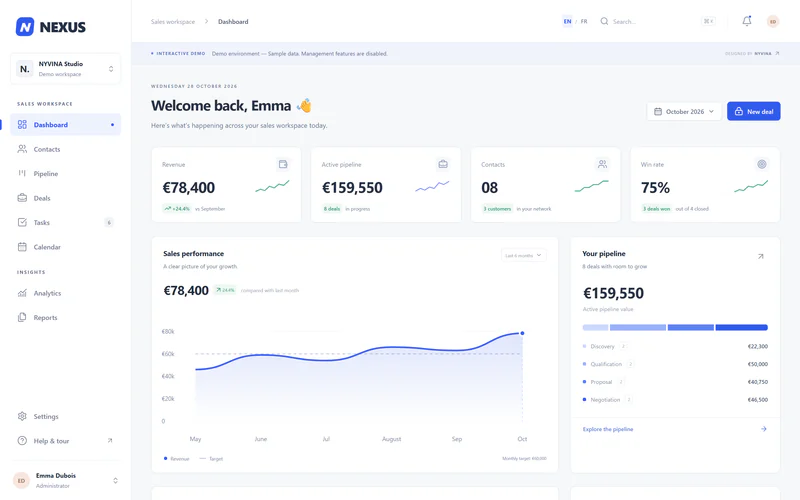
NEXUS CRM, a concept you can open.
A sales workspace in nine modules, designed and built by NYVINA to show the interface quality we work to. It runs online with sample data. A real project adds the rules, data, access and connections described above.


What it demonstrates
- DashboardRevenue, active pipeline and win rate, calculated from the sample records.
- CRMContacts and deals with filters, detail panels and a global search (Ctrl+K).
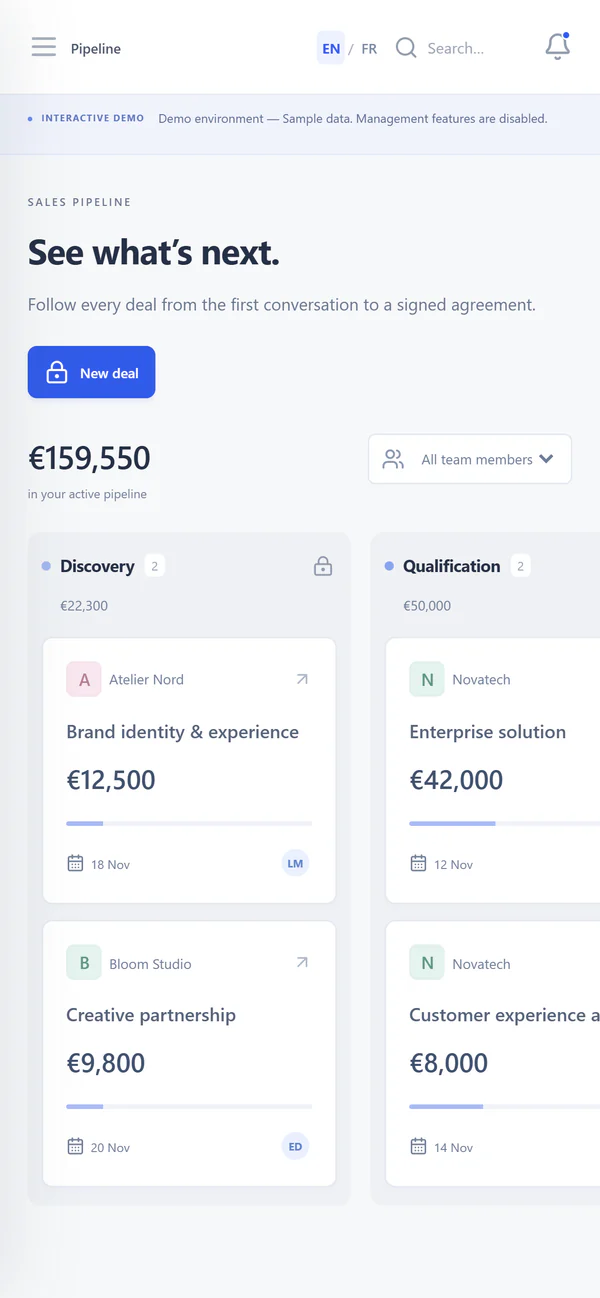
- PipelineEvery deal on a board by stage, from the first conversation to the signature.
- AnalyticsCharts, three monthly reports and a calendar for October 2026.
- A multipage interfaceNine modules with side navigation, a phone menu and full keyboard use.
Concept demo
Fictional team and sample data. There is no backend: edits and exports are disabled in the demo.
How a software project runs.
Four steps on every project. What each one includes is agreed with you during scoping.
Scope
We study the process, the people involved and the data, then agree in writing on the scope and the screens.
Design
Mockups of the key screens, reviewed with the people who will use them.
Build
Development to the agreed scope, in stages you can review and test.
Launch
Going live as agreed for your project: access set up and, where the scope includes them, data import, documentation and team onboarding.
Questions before you write.
Short answers. The details depend on each project and are agreed during scoping.
Do we need a detailed specification first?
No. A few sentences about the need are enough to begin. The scope is then written with you during the first step.
Can the software work with the tools we already use?
Often, when those tools offer an API or an export. Each connection is checked during scoping, before it becomes part of the project.
Can our existing data be brought in?
It depends on its format and quality. We look at your spreadsheets and exports during scoping; an import is part of the project when it is feasible and agreed in the scope.
Can we start with a smaller first version?
Yes, if it suits your project. A first version focused on the most useful screens is one possible approach, not a requirement.
Describe the tool your team is missing.
A few sentences about the work and the people involved are enough to start.
Discuss your software project